
Backend Development for Beginners
Learn what happens behind a website or app: how servers handle requests, apply rules, protect accounts, work with databases and send useful responses.
Frontend
Backend
Database
POST /api/enrolments
201 Created
What is backend development?
Backend development is the work of building the part of a website or application that runs behind the screen. Users normally do not see this code, but they depend on it every time they sign in, search, place an order, upload a file or receive a notification.
The backend receives requests from a website or mobile app, checks whether they are valid, applies the application’s rules, reads or saves information and returns a response.
Frontend
Shows information and collects actions from the user.
Backend
Processes those actions and decides what should happen next.
Simple way to remember: the frontend asks, the backend decides, and the database remembers.
If these parts are new to you, begin with our website and app development guide. You can also read the companion frontend development guide.
What happens when a student enrols in a course?
Imagine a student clicks “Enrol” in a course portal. A lot can happen in less than a second.
Receive the request
The frontend sends the student ID and selected course to a backend address called an endpoint.
Check the user and data
The backend checks whether the student is signed in and whether the course information is valid.
Apply the rules
It checks whether seats are available and whether the student is already enrolled.
Save and respond
The database stores the enrolment and the backend sends a success response to the frontend.
A small backend example
The exact code changes between languages and frameworks, but the thinking stays similar:
// Receive a request to create an enrolment
app.post("/api/enrolments", async (request, response) => {
  const { studentId, courseId } = request.body;

  if (!studentId || !courseId) {
    return response.status(400).json({ error: "Missing details" });
  }

  const enrolment = await database.enrolments.create({
    studentId, courseId
  });

  return response.status(201).json(enrolment);
});
This example receives information, validates it, saves a record and returns a response. A real application would also check permissions, course capacity, duplicate enrolments and possible errors.
What does a backend developer do?
Backend developers turn business requirements into reliable application rules. Their work often includes:
In a small project, one backend may serve a website and a mobile app. In a larger company, backend work may be divided across API, platform, database, payment, security and infrastructure teams.
Backend languages and frameworks
A programming language gives you the basic rules for writing logic. A framework gives you a ready structure for common web work such as routes, validation, database access, security and testing.
| Language or runtime | Common frameworks | Why learners choose it |
|---|---|---|
| JavaScript / TypeScript | Node.js with Express, NestJS or Fastify | Useful when you want one language across frontend and backend |
| PHP | Laravel or Symfony | Practical for business applications and widely available hosting |
| Python | Django, FastAPI or Flask | Clear syntax and useful for web, data and automation work |
| Java | Spring Boot | Common in large applications and enterprise teams |
| C# | ASP.NET Core | Strong fit for Microsoft-based development environments |
| Go | Standard library, Gin or Fiber | Often chosen for simple, efficient services |
| Ruby | Ruby on Rails | A productive framework with clear conventions |
You do not need to learn every stack. Choose one language, learn its fundamentals, use one framework and complete a real database-backed project.
JavaScript with Node.js can feel familiar to frontend learners. PHP with Laravel is practical for many web projects. Python with Django or FastAPI is approachable and flexible. Java with Spring Boot and C# with ASP.NET Core are common choices for structured, larger systems. The right starting point depends on your goals and opportunities—not on one universal ranking.
What are APIs, endpoints and HTTP methods?
An API is a clear agreement for how one piece of software can ask another piece for information or an action. An endpoint is one specific API address.
| Method | Usual purpose | Example |
|---|---|---|
| GET | Read information | Get all available courses |
| POST | Create something new | Create a course enrolment |
| PUT / PATCH | Update information | Change a student profile |
| DELETE | Remove something | Cancel an enrolment |
Status codes are part of the answer
Request succeeded
New record created
Request data is invalid
Server failed unexpectedly
REST APIs are a common starting point. You may later meet GraphQL for flexible data queries and WebSockets for live two-way communication such as chat or real-time dashboards.
How does a backend use a database?
The backend controls how application information is created, read, updated and deleted. These four actions are often shortened to CRUD.
Create
Add an enrolment
Read
View courses
Update
Change a profile
Delete
Cancel a record
Database types beginners should know
PostgreSQL, MySQL, SQLite
Store structured information in related tables. This is a strong first database model for most learners.
MongoDB
Stores flexible document-shaped information. Useful for the right data, but not automatically better than SQL.
What is an ORM?
An Object-Relational Mapper helps application code work with database tables through models and methods. Examples include Eloquent in Laravel, Django’s ORM, Prisma in TypeScript projects and Entity Framework Core in .NET. ORMs are useful, but you should still learn SQL and database relationships.
A later dedicated guide will cover databases in more depth. For now, focus on tables, rows, primary keys, relationships, constraints, basic queries and indexes.
Authentication, authorisation and security
Authentication asks, “Who are you?” Authorisation asks, “What are you allowed to do?” A student may be signed in but still must not be allowed to open an administrator report.
Authentication
Checks identity using a session, secure cookie, token or another sign-in method.
Authorisation
Checks roles, ownership and permissions before allowing an action.
Security habits to learn early
- Validate all incoming information
- Hash passwords with trusted libraries
- Keep secrets outside source code
- Use parameterised database queries
- Check permissions on every protected action
- Update dependencies and record errors safely
Never create your own password encryption. Use the security features and trusted libraries recommended by your framework, and never store plain-text passwords.
Supporting services used by backend applications
A beginner project may only need one application and one database. As needs grow, other services can take on specific jobs.
Cache
Keeps frequently used information ready for faster access. Redis is one common option.
Queue
Moves slower work, such as sending many emails, outside the immediate request.
File storage
Stores uploads such as profile images, certificates and documents.
External services
Connect payments, maps, messaging, email and other third-party features.
Do not begin by splitting a small project into many microservices. First learn to build one clear, well-organised application. Add complexity only when the problem requires it.
Tools backend developers use
| Tool or skill | What it helps you do |
|---|---|
| Code editor or IDE | Write, organise, run and debug backend code |
| Terminal | Start applications, run migrations and use development commands |
| Git and GitHub | Track changes and collaborate safely |
| API client | Test requests and responses without building a frontend first |
| Database client | Inspect tables, queries and stored information |
| Automated tests | Check rules, endpoints and important user flows |
| Logs and monitoring | Understand failures and behaviour after deployment |
| Docker basics | Run applications and supporting services in repeatable environments |
Deployment means running your backend on a server or cloud platform where users can reach it. Learn environment variables, production databases, HTTPS, logs, backups and the difference between development and production settings.
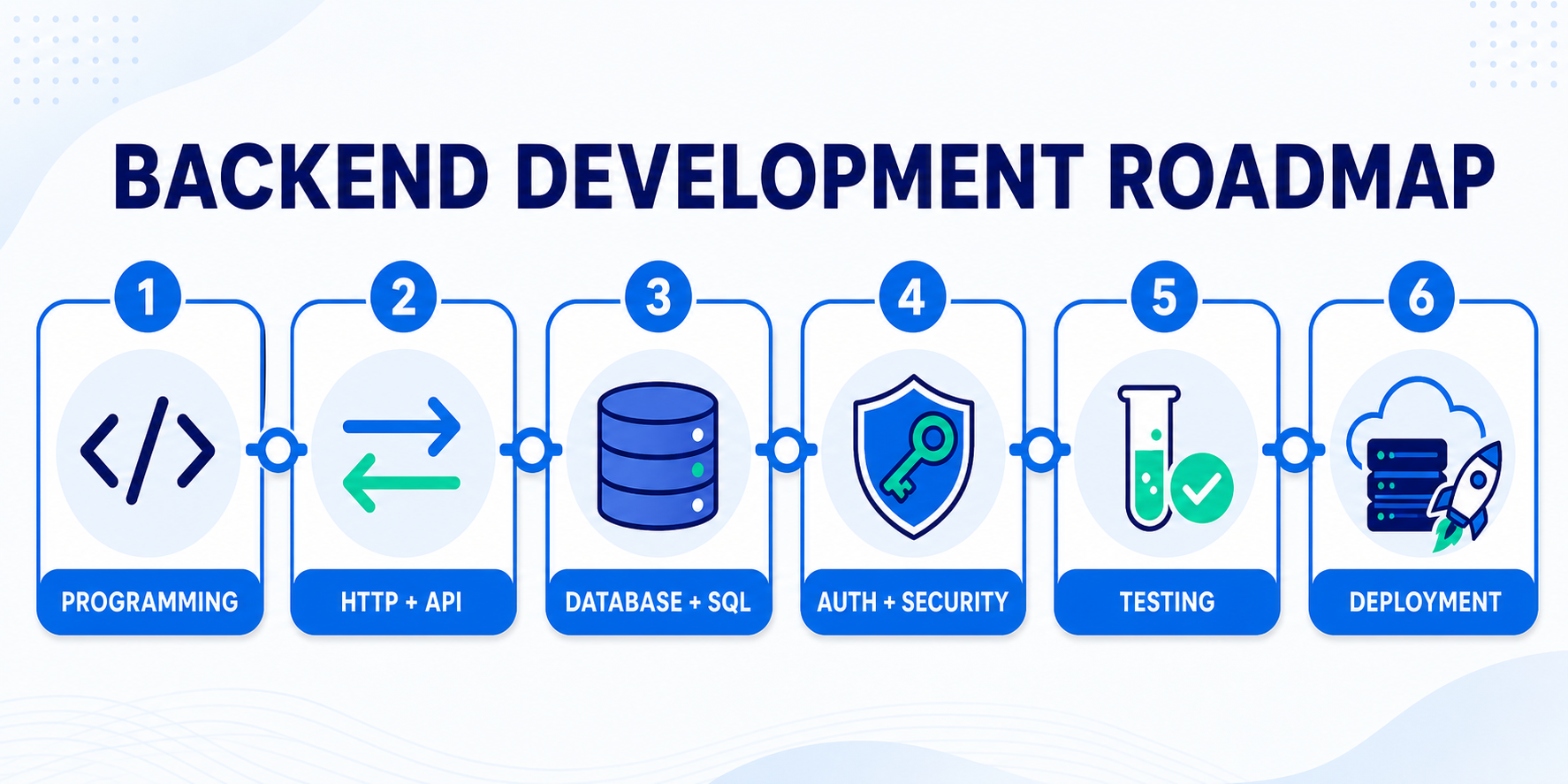
Backend development learning roadmap
Learn one layer at a time and build something small at every stage. Understanding is more useful than rushing through several frameworks.
Learn one programming language
Variables, conditions, loops, functions, objects, errors and basic data structures.
Understand the web and HTTP
Clients, servers, URLs, requests, responses, methods, headers and status codes.
Learn one backend framework
Routes, controllers, configuration, validation and clear project structure.
Learn SQL and data modelling
Tables, relationships, keys, constraints, queries and migrations.
Build and test APIs
JSON, CRUD endpoints, errors, pagination and API testing tools.
Add accounts and security
Authentication, authorisation, password hashing and safe secret handling.
Use Git, tests and logs
Track changes, test important rules and understand failures.
Deploy a complete capstone
Run the application online with a production database, documentation and backups.
Backend projects for each stage
| Stage | Project idea | What it practises |
|---|---|---|
| Language basics | Command-line expense tracker | Functions, data structures, files and errors |
| First API | Notes API | Routes, CRUD, JSON and status codes |
| Database practice | Library management backend | Tables, relationships, queries and validation |
| Authentication | Student task manager | Accounts, sessions or tokens, permissions and ownership |
| External service | Appointment booking system | Email, schedules, transactions and error handling |
| Capstone | Placement and internship portal | Complete API, roles, database, tests, files and deployment |
A backend portfolio cannot be judged only by screenshots. Add clear API documentation, a database diagram, setup instructions, sample requests and a short explanation of your security decisions.
Final-year students can also explore NSL’s project and internship guidance.
Backend development questions beginners ask
Which backend language should I learn first?
Choose one that matches the projects and opportunities around you. JavaScript, PHP and Python are approachable starting points; Java and C# are strong structured choices. Finishing one real project matters more than repeatedly changing languages.
Do I need to know frontend development?
You do not need advanced frontend skills, but basic HTML, forms, browser behaviour and API usage will help you understand how your backend is used.
Should I learn SQL or MongoDB first?
SQL and relational data are a strong first choice because they teach tables, relationships, constraints and structured queries. Learn MongoDB later when a document model fits the application.
Is backend development harder than frontend development?
They involve different challenges. Backend work focuses more on logic, data, security and reliability. Frontend work focuses more on user interaction, browser behaviour and visual implementation. Neither is automatically easier.
Do backend developers need advanced mathematics?
Most business applications need logical thinking more often than advanced maths. Special areas such as cryptography, data science, graphics or complex financial systems may require more mathematics.
Can AI build my backend for me?
AI can draft routes, queries and tests, but backend mistakes can expose private data or money. You must understand, review and test generated code, especially authentication, permissions, database changes and security.
Useful official references
Documentation is part of everyday backend work. These official resources are useful for checking concepts and continuing your learning:
Want a clear path into backend development?
Learn backend programming, APIs, SQL, authentication, testing and deployment through practical applications with mentor guidance.
Next Skill Labs Editorial Team
Practical technology guidance reviewed by NSL trainers.